AI & Technology
Claude Comes to Google Docs, Sheets, and Slides: AI Now Works Directly Inside Google Workspace
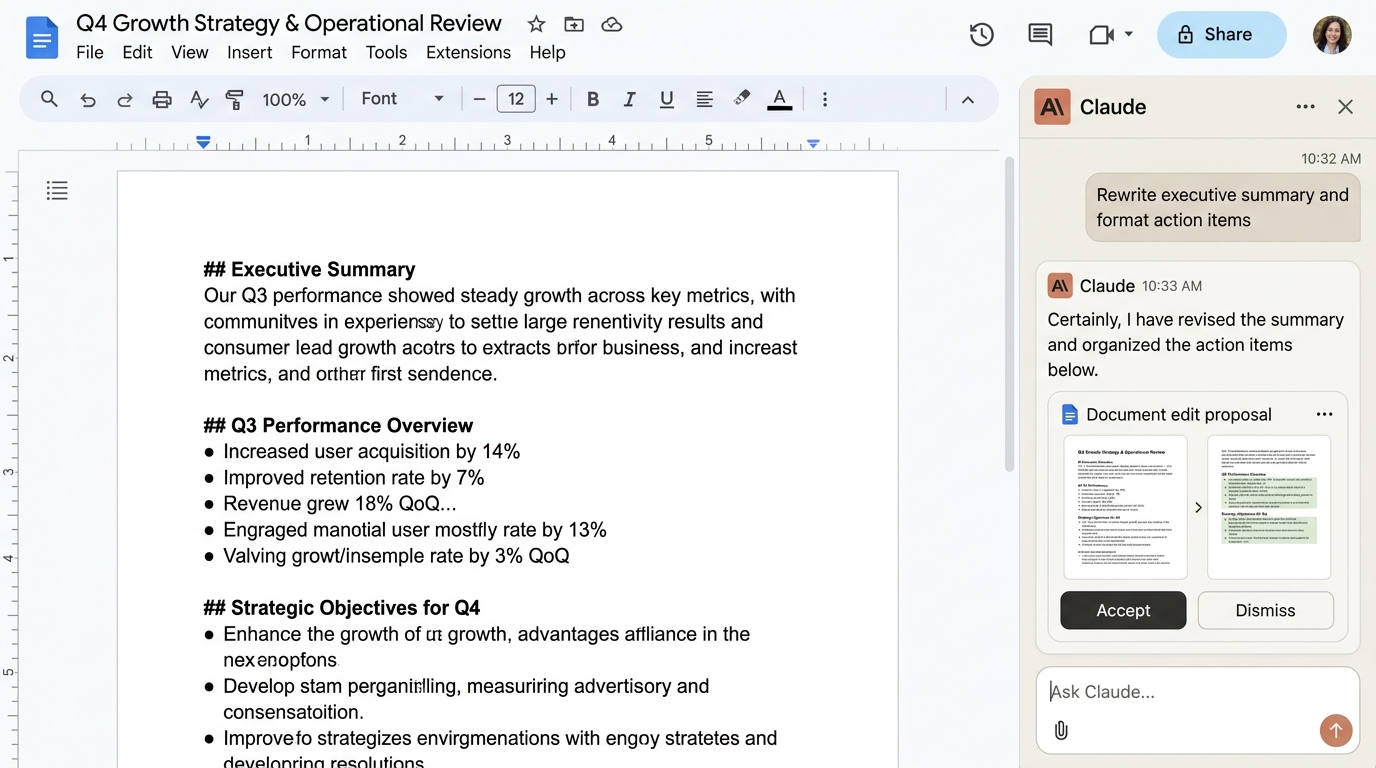
Overview: AI Directly Inside Google Workspace
Anthropic is bringing Claude closer to where people already work. The company has introduced a Claude sidebar for Google Workspace, allowing users to work with Claude directly inside Google Docs, Google Sheets, and Google Slides.
The new integration reduces the need to constantly switch between Google Workspace and the Claude app. Users can open a document, spreadsheet, or presentation and ask Claude to analyze, create, or edit content directly from the sidebar.
The feature is now available in public beta for paid Claude plans.
What Is Claude for Google Workspace?
Claude for Google Workspace is an integration that brings Anthropic's AI assistant directly into Google Docs, Sheets, and Slides.
Previously, users often had to copy content from a Google file, paste it into Claude, receive a response, and then copy the result back into their Google file.
With the new integration, Claude can work directly with the file you're currently using.
For example, someone working on a report in Google Docs could ask Claude to:
- Summarize the document into concise executive takeaways
- Rewrite a section for different target audiences
- Improve grammar, phrasing, and editorial flow
- Make the writing more professional and authoritative
- Organize information and outline key arguments
- Create or modify content seamlessly in-place
Integration Across Docs, Sheets, and Slides
In Google Sheets, Claude can help analyze data, work with complex formulas, clean messy datasets, and create charts. In Google Slides, it can help brainstorm slide layouts, turn outlines into formatted slides, and refine presentation talking points.
When Was It Released?
Anthropic introduced the Claude Google Workspace integration in October 2026 and made it available as a public beta for paid Claude plans.
The integration is designed to make Claude a more natural part of everyday productivity workflows rather than requiring users to treat Claude as a separate, disconnected application.
How Does Claude's Google Workspace Integration Work?
The integration works through a dedicated Claude sidebar inside Google Workspace.
After installing the Claude add-on, users can open a Google Doc, Sheet, or Slide and launch Claude from the Extensions menu.
The basic workflow looks like this:
For example, imagine you have a 10-page project report in Google Docs.
Instead of copying the entire report into Claude, you can open the Claude sidebar and ask:
“Summarize this document into five key points.”
You could then ask:
“Rewrite the introduction in a more professional tone.”
Claude can work directly with the document and apply the requested changes.
Claude in Google Docs
Google Docs is one of the most obvious use cases for the new integration.
Users can ask Claude to analyze and improve documents without leaving Google Docs.
For example:
Prompt:
“Rewrite this paragraph to make it easier to understand.”
Or:
“Summarize this document and create a short executive summary.”
Claude can help with writing, editing, summarization, restructuring, and other document-related tasks.
This can be particularly useful for reports, proposals, research documents, meeting notes, and other long-form content.
Claude in Google Sheets
Claude can also work directly with spreadsheet data.
For example, a user could ask:
“Find the problem with this formula.”
Or:
“Clean this dataset and standardize the date format.”
Claude can help with formulas, data analysis, spreadsheet organization, and visualization tasks.
This makes the integration useful for people who regularly work with business data but don't want to manually perform every spreadsheet operation.
Claude in Google Slides
Claude can also assist with presentations.
For example, you could ask:
“Turn this information into a five-slide presentation.”
Or:
“This slide contains too much text. Make it shorter and easier to understand.”
Claude can help create and modify presentation content, making it easier to turn raw information into a structured presentation.
How to Use Claude in Google Workspace
Getting started is relatively simple across four steps:
- Step 1: Install the Claude Add-on — Install the Claude Google Workspace add-on. One installation provides access to Claude across Google Docs, Sheets, and Slides.
- Step 2: Open a Google File — Open the Google Doc, Sheet, or Slide you want to work with.
- Step 3: Open Claude — From the Google Workspace menu, navigate to: Extensions → Claude → Open Claude. Claude will open directly in a dedicated sidebar.
- Step 4: Give Claude an Instruction — Type what you want Claude to do (e.g., “Review this document and improve the grammar”). Claude will analyze the content and execute your request.
Why Is This Important?
The biggest advantage is the reduction of unnecessary context switching.
The traditional workflow looks like:
The new workflow becomes:
This might seem like a small change, but it can save significant time for people who use AI throughout their workday.
Instead of treating AI as a separate application, Claude becomes part of the workspace where the actual work is happening.
Claude Is Becoming More Like an AI Coworker
The bigger trend behind this integration is the shift from AI chatbots to AI assistants that can work inside existing applications.
Rather than simply answering questions, AI systems are increasingly being connected to the tools people already use for writing, spreadsheets, presentations, coding, and business workflows.
Claude's Google Workspace integration is another step in that direction.
For example, a user could potentially start with a report in Google Docs, analyze related information in Sheets, and prepare a presentation in Slides — all while using Claude to assist with the workflow.
Final Thoughts
Anthropic's new Claude integration makes Google Workspace more AI-friendly by bringing Claude directly into Docs, Sheets, and Slides.
The biggest benefit is simple: users no longer need to constantly copy and paste information between Google Workspace and Claude.
Whether you're writing a report, analyzing spreadsheet data, or preparing a presentation, Claude can now work much closer to the content itself.
As AI assistants become increasingly integrated into the applications people use every day, features like this could mark a shift from “asking AI for help” to “working alongside AI.”
The Workspace Evolution
From “Constant tab switching and manual copy-pasting”
To “In-situ AI sidebars collaborating directly inside documents, sheets, and slides.”