AI & Technology
ChatGPT Gets GPT-6 and a More Visual, Interactive User Interface
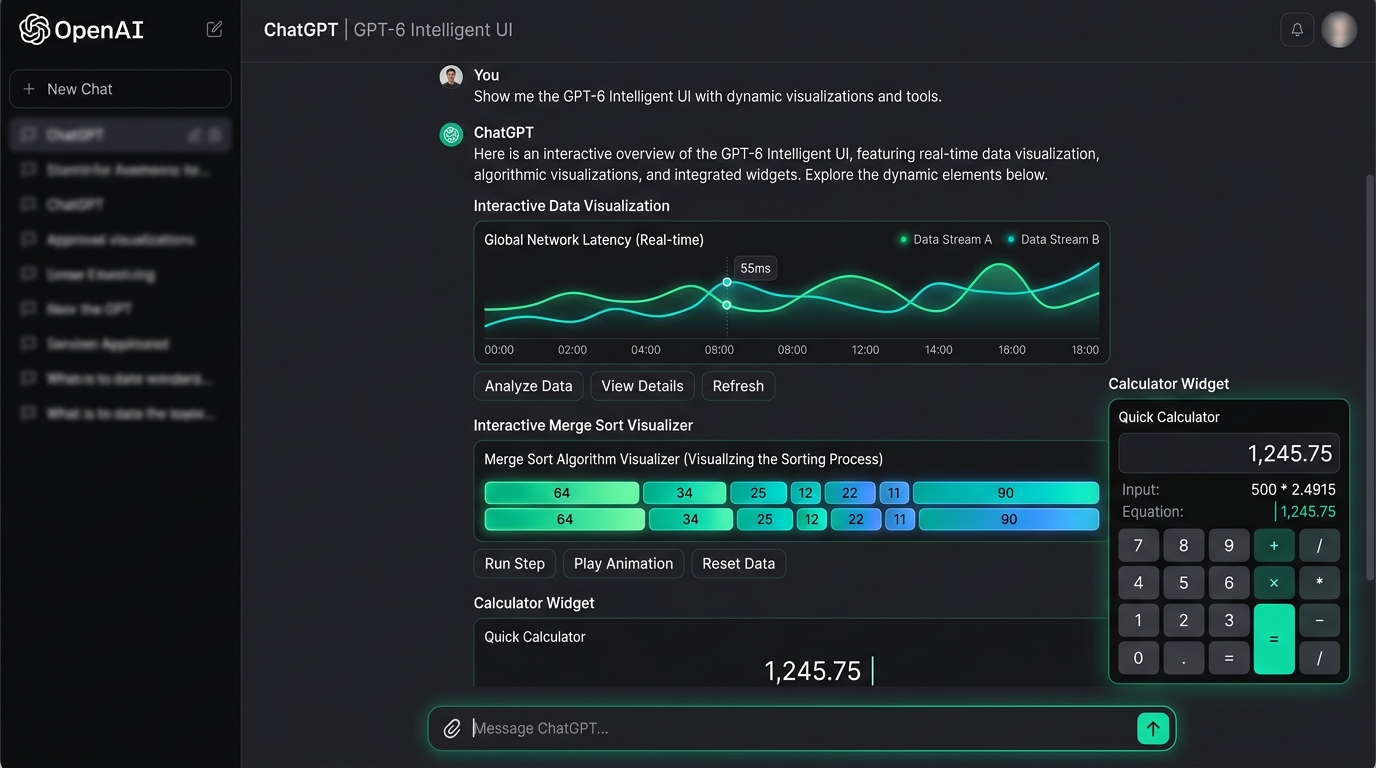
Overview: A New Visual Experience for ChatGPT
OpenAI is bringing a new visual experience to ChatGPT, combining AI-generated answers with interactive charts, graphics, buttons, and tools.
The update aims to make information easier to understand and help users interact with AI responses directly inside conversations.
What Is the GPT-6 and Intelligent UI Update?
OpenAI is reportedly expanding access to GPT-6 while introducing a redesigned ChatGPT interface that goes beyond traditional text-based responses. Instead of displaying only paragraphs and bullet points, ChatGPT can present information through visual elements, interactive components, and structured layouts.
The idea is to make AI conversations more useful, especially when users need to understand complex topics, explore data, or complete practical tasks.
For example, someone asking ChatGPT to explain a programming algorithm could receive a visual breakdown of its steps. A user analyzing business performance might see charts and comparisons instead of reading a lengthy explanation.
What Is Intelligent UI?
Intelligent UI refers to an interface that adapts how information is presented according to the user's request.
Traditionally, AI chatbots have relied primarily on text. Users ask questions, and the chatbot responds with written explanations, code, or lists. Although this approach works well for many tasks, it can be less effective when information is easier to understand visually.
With an interactive interface, ChatGPT can combine written explanations with elements such as:
- Interactive charts: Explore trends, comparisons, and data.
- Visual diagrams: Understand programming concepts, processes, and technical systems.
- Clickable buttons: Select options or move through guided experiences.
- Interactive tools: Work with calculators, quizzes, and other task-specific components.
- Structured layouts: Present information in organized sections instead of long blocks of text.
The Objective of Intelligent UI
The objective is to make AI responses more dynamic, allowing users to explore information rather than simply read it.
Prompt → Static Text, Code Blocks & Bullet Points
Prompt → Dynamic Interactive Charts, Live Tools & Adaptive Layouts
How Does the New Interface Work?
The experience combines AI-generated responses with interface components that display information in a suitable format.
When a user submits a prompt, ChatGPT interprets the request and generates a response. Depending on the task and available capabilities, the answer may include text, visual elements, interactive controls, or a combination of these.
For example, a user learning Merge Sort could receive a step-by-step explanation showing how an array is divided into smaller parts and then combined in sorted order.
Similarly, someone asking about monthly sales could receive a chart that makes it easier to identify increases, decreases, and patterns.
The interface can make complicated information easier to navigate, while written explanations provide the context needed to understand the results.
How Could This Change the ChatGPT Experience?
The shift toward interactive responses could change how people use AI for learning, research, and everyday work across four primary areas:
1. A Better Learning Experience
Students and developers often struggle with abstract concepts that are difficult to understand through text alone. Visual explanations can make subjects such as algorithms, mathematics, and science easier to follow.
For instance, a beginner learning binary search could explore how the search range becomes smaller after each step. This can help connect theoretical explanations with practical examples.
2. More Useful Data Analysis
Charts and visual summaries can help users interpret large amounts of information more quickly.
Instead of reading a lengthy report, a user could examine a chart, compare categories, and identify trends. Interactive filters could make it easier to focus on specific periods or groups when supported.
3. Interactive Tools Within Conversations
AI conversations could become more practical when users can manipulate interface elements directly.
A budgeting calculator, a learning quiz, or a planning tool could allow users to change inputs and explore different outcomes without repeatedly typing new instructions.
These experiences could reduce friction and make ChatGPT useful for more task-oriented workflows.
4. A More Natural User Experience
People do not always prefer the same way of receiving information. Some questions need a short written answer, while others benefit from charts, diagrams, or structured comparisons.
An adaptive interface can choose a presentation style that fits the task, rather than requiring users to work with a single format for every request.
What Does This Mean for Developers?
The combination of AI models and interactive interfaces could create new opportunities for software developers.
Developers working with technologies such as Python, FastAPI, and React can already build AI-powered applications that combine model-generated content with traditional user interfaces.
For example, a real-estate platform could use an AI assistant to help users understand property information. Instead of returning only a written summary, the application could present property cards, inquiry charts, project comparisons, and filters.
However, generating an interface is only one part of building a reliable application. Developers must still manage:
- API integrations and reliable request handling
- Authentication and role-based permissions
- Data validation and schema enforcement
- Security safeguards and user privacy management
Designing AI-Powered Workflows
As AI interfaces become more capable, developers may increasingly focus on designing workflows that combine AI reasoning with reliable application functionality.
Are There Any Limitations?
Interactive AI interfaces are promising, but they do not eliminate the limitations of AI-generated content:
- Visual answers may not be necessary for simple questions: Complicated interfaces can sometimes make information harder to navigate.
- Accuracy verification: Generated charts and calculations still need to be checked for accuracy and hallucination risks.
- Feature availability constraints: Rollout and capabilities depend on the selected model tier, subscription plan, and platform support.
- Model upgrade vs. UI upgrade: A more visual interface changes how answers are presented; it does not automatically guarantee that the underlying model is more accurate.
The Future of AI Interfaces
The broader direction is clear: AI assistants are evolving from systems that primarily generate text into tools that can help users interact with information and complete tasks.
If this approach continues to develop, AI applications could become more adaptive, combining conversational assistance with visualizations, interactive workflows, and task-specific tools.
For users, that could mean easier learning, clearer data analysis, and more practical assistance. For developers, it creates opportunities to build applications in which AI-generated answers become part of the user experience rather than remaining isolated text responses.
Conclusion
The reported GPT-6 and Intelligent UI update highlights an important direction in conversational AI: making responses more visual, interactive, and useful for real-world tasks.
By combining written explanations with charts, graphics, and interactive components, ChatGPT could make complex information easier to explore and understand.
The long-term impact will depend on the accuracy of the underlying models, the quality of the interface, and how effectively these capabilities are integrated into everyday workflows. If implemented well, interactive AI interfaces could become an important part of how people learn, analyze information, and use software.
The Conversational UI Evolution
From “Static text messages and code snippets”
To “Adaptive Intelligent UI with interactive charts, live tools, and dynamic visual layouts.”