AI & Technology
Apple Launches Its First Touchscreen MacBook Pro: Everything You Need to Know About PROLED XDR Display, M5 Pro/Max and AI Features
Overview: Apple's First Touchscreen Mac
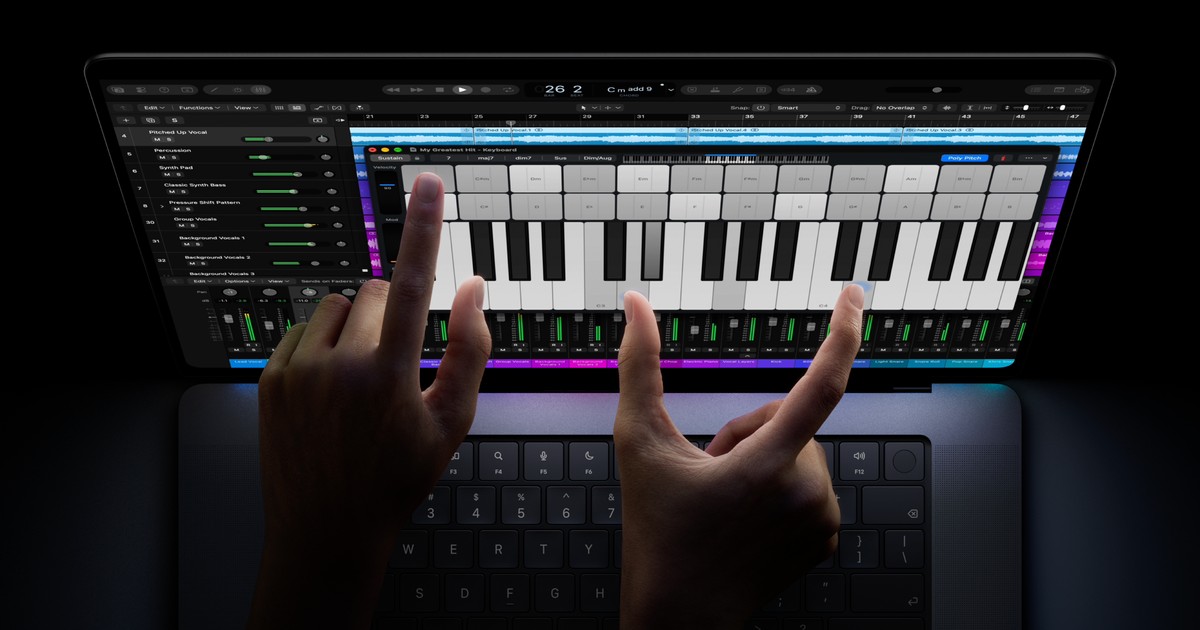
Apple has taken a major step forward in its MacBook lineup by introducing its first-ever touchscreen MacBook Pro. Announced on October 28, 2026, the new MacBook Pro with PROLED XDR Display brings touchscreen capabilities to Mac for the first time, along with a tandem OLED display, powerful M5 Pro and M5 Max processors, Dynamic Island, and advanced on-device AI capabilities.
For years, Apple users have interacted with MacBooks primarily through a keyboard and trackpad. With this launch, Apple is introducing a new way to interact with laptop content while retaining the traditional MacBook experience.
The new MacBook Pro is available in 14-inch and 16-inch models and promises up to 24 hours of battery life. Pre-orders started on October 28, with availability beginning November 6 globally and November 9 in India.
1. What Is Apple's New Touchscreen MacBook Pro?
The new MacBook Pro is Apple's professional laptop featuring a touchscreen display powered by tandem OLED technology, which Apple calls PROLED XDR.
Its biggest innovation is the integration of touch capabilities directly into macOS. Users can interact with applications, images, presentations and other content using their fingers instead of relying entirely on a trackpad.
The device is designed for professionals, developers, designers, photographers, video editors and other users who need powerful hardware for demanding workloads.
- PROLED XDR display: Powered by tandem OLED technology for extreme dynamic range and true blacks.
- Touchscreen interaction: Direct display interaction with macOS-optimized multi-touch gestures.
- M5 Pro and M5 Max processors: High-performance Apple Silicon built for intensive computing and creative workflows.
- Dynamic Island: Persistent status and interaction hub for notifications, media controls, and Spotlight.
- On-device AI processing: Capable of running local LLMs with hundreds of billions of parameters.
- Up to 24 hours battery life: Groundbreaking efficiency across professional mobile workloads.
2. Release Date, Availability & Pricing
Apple officially announced the new MacBook Pro on October 28, 2026.
Important Launch Dates:
| Event | Date |
|---|---|
| Official announcement | October 28, 2026 |
| Pre-orders started | October 28, 2026 |
| Global availability | November 6, 2026 |
| India availability | November 9, 2026 |
The laptop comes in two display sizes: 14-inch MacBook Pro and 16-inch MacBook Pro.
Pricing in India:
| Model | Starting Price |
|---|---|
| 14-inch M5 Pro | ₹3,49,900 |
| 16-inch M5 Pro | ₹4,09,900 |
| 14-inch M5 Max | ₹5,49,900 |
| 16-inch M5 Max | ₹5,89,900 |
The final price depends on the selected configuration and storage options.
3. How Does the Touchscreen Technology Work?
One of the biggest changes in the new MacBook Pro is its touchscreen functionality. Unlike traditional MacBooks, where users depend on the trackpad and keyboard, the new model allows users to interact directly with the display.
How does it work?
Apple has integrated the touch sensor directly into the display panel rather than adding a separate touch layer on top. This integration reduces reflection, maintains display clarity, and minimizes latency so interactions feel instantaneous.
- Swipe to scroll: Move smoothly through long webpages, code editors, and documents.
- Pinch to zoom: Inspect intricate details in photographs, diagrams, and design artboards.
- Drag and drop: Reorder presentation slides, files, and timeline assets directly on screen.
- Double-tap window controls: Instantly expand, tile, or adjust application windows.
- Creative app interaction: Draw, sculpt, and tweak creative controls directly on the canvas.
- Who benefits: Graphic designers can use the display as a digital canvas, video editors can scrub timelines directly, and developers can test touch interactions in iOS and iPadOS apps.
- Complementary interaction: Keyboard and trackpad remain fully functional; touch is an additional interaction method rather than a forced replacement.
4. What Is PROLED XDR Display?
The new MacBook Pro introduces PROLED XDR, Apple's display technology based on tandem OLED.
Understanding OLED:
OLED stands for Organic Light-Emitting Diode. Unlike traditional LCD displays that require an external backlight, OLED pixels generate their own light. This allows individual pixels to turn off completely when displaying black, producing deeper blacks, infinite contrast, and vibrant colours.
What makes tandem OLED different?
Tandem OLED technology uses multiple light-emitting OLED layers stacked together. This architecture dramatically improves sustained peak brightness, power efficiency, and long-term panel longevity.
- Up to 2,000 nits peak brightness: Unmatched outdoor visibility and brilliant HDR highlights.
- 10,000,000:1 contrast ratio: Inky blacks and ultra-fine shadow detail.
- 120Hz ProMotion variable refresh rate: Silky smooth scrolling and responsive touch tracking.
- P3 and Adobe RGB color gamuts: Complete professional color calibration right out of the box.
- How users benefit: Photographers can review high-resolution raw files, video editors can master HDR with high contrast precision, and designers can trust exact color reproduction.
5. Dynamic Island Comes to MacBook
Apple has also introduced Dynamic Island to the Mac for the first time. Dynamic Island is an interactive area that displays important information, notifications, and ongoing background activities.
Previously introduced on Apple's iPhone lineup, Dynamic Island on the new MacBook Pro becomes a centralized interactive location for Spotlight, Live Activities, and Siri AI.
How does it work in practice?
Imagine you are working on a software development project while listening to music or running cloud jobs. Instead of switching between multiple applications, you can use Dynamic Island to:
Dynamic Island Features & Benefits
- Control media playback: Pause, skip tracks, and scrub audio directly from the top bar.
- Access Siri AI: Prompt Siri with on-screen context without cluttering your workspace.
- View real-time activities: Track render progress, build status, file downloads, or timers.
- Check incoming notifications: Receive unobtrusive alerts for messages, calendar events, and reminders.
- Interact with calls and AirDrop: Accept incoming calls and manage file transfers in one click.
- Quick Spotlight access: Jump straight into searches and system actions instantly.
6. M5 Pro and M5 Max: Powerful Processors for AI and Professional Workloads
The new MacBook Pro features Apple's M5 Pro and M5 Max processors. A processor is often described as the brain of a computer because it executes instructions, performs calculations, and coordinates computing tasks.
Apple has designed these chips for demanding professional workloads including software development, video editing, 3D modelling, and AI applications.
What makes M5 Pro and M5 Max interesting?
One standout feature is the Neural Accelerator integrated into each GPU core. These accelerators are purpose-built to dramatically speed up AI-related tensor calculations.
The processors also offer powerful CPU and GPU architectures, higher unified memory bandwidth, and industry-leading performance per watt.
How M5 Silicon Benefits AI Developers
One of the most compelling applications is running large language models (LLMs) locally.
For example, an AI developer can download a compatible open-weights language model and run it directly on the MacBook instead of sending every request to a cloud-based AI service. Apple says the M5 Max can run LLMs with hundreds of billions of parameters entirely on the device, depending on configuration and memory capacity.
- Local AI experimentation: Test and fine-tune machine learning models without internet dependencies.
- AI-powered software development: Build and iterate on autonomous agents and local code-generation tools.
- Zero-latency local inference: Execute queries instantaneously without waiting for network transfers.
- Data privacy & compliance: Keep proprietary code, documents, and datasets strictly within your hardware.
- Offline productivity: Continue developing and running intelligent tools anywhere, anytime.
7. On-Device AI: How Does It Work?
On-device AI refers to artificial intelligence processing that happens directly on a device instead of relying entirely on remote cloud servers.
Traditionally, many AI applications send user requests across the internet to remote data centers, where large GPUs process the information and return the results. With on-device AI, compatible models run directly on the laptop's local silicon.
Cloud AI vs On-Device AI:
| Cloud-based AI | On-device AI |
|---|---|
| Processing happens on remote servers | Processing happens locally on device |
| Usually requires internet connectivity | Supported tasks work completely offline |
| Requests involve sending data to external services | Data remains secure on your machine |
| Depends on cloud infrastructure & API limits | Depends on local hardware resources |
Real-World Example:
Suppose a developer wants to experiment with an AI chatbot. Using cloud-based AI, the developer might send prompts to an external API and receive responses with latency and recurring costs. With a compatible local AI model on the M5 MacBook Pro, the developer can run the chatbot directly on their laptop, eliminating API reliance and protecting user data. While some services still require internet access, on-device AI provides unmatched speed and privacy for supported workloads.
8. Who Can Benefit from the New MacBook Pro?
The new MacBook Pro is primarily designed for professional users who require heavy computation, color accuracy, and modern interaction:
- Software Developers: Compile massive codebases, run containerized environments, experiment with local LLMs, and test touch interactions in iOS and iPadOS apps.
- Graphic Designers: Draw, select, and manipulate visual elements directly on the touchscreen canvas with natural hand gestures.
- Video Editors: Scrub timelines, trim clips, and grade high-dynamic-range video with pinpoint tactile precision.
- Photographers: Utilize the tandem OLED display and wide color gamuts to review and retouch high-resolution imagery.
- 3D Artists: Leverage M5 Max GPU performance for demanding 3D rendering, animation, and real-time modeling.
- Students and Researchers: Handle demanding computational applications, complex simulations, and AI experiments without needing cloud compute clusters.
9. Why Is This Launch Important for the Future of Computing?
Apple's touchscreen MacBook Pro represents an important milestone in laptop design and computing strategy for three key reasons:
- 1. A New Way to Interact With Laptops: Apple is bringing touchscreen interaction to its traditional MacBook experience, giving users unprecedented flexibility across creative, productivity, and technical applications.
- 2. AI Becoming Core to Personal Computing: The M5 Pro and M5 Max processors demonstrate Apple's strong commitment to local AI processing. As AI workloads become more ubiquitous, powerful on-device neural hardware will become essential.
- 3. Seamless Hardware and Software Integration: Apple combines custom processors, macOS, tandem OLED display tech, and native software into one cohesive experience, maximizing performance and usability.
10. Final Thoughts & Resources
Apple's new touchscreen MacBook Pro is more than just a laptop with a touch layer. It combines tandem OLED PROLED XDR display technology, multi-touch gestures, M5 Pro and M5 Max processors, Dynamic Island, and on-device AI processing into one unified professional workstation.
For developers, designers, video editors, and AI researchers, these features introduce powerful new ways to create and build. While casual users who mainly browse the internet or edit documents may not need this level of hardware, it sets a bold benchmark for what professional laptops can achieve.
The Next Generation of Mac Computing
Bridging “Tandem OLED Touchscreen” with “On-Device AI Silicon”
“Bringing touch interaction and local AI together on macOS.”